Summary
When launching the LVS software for the LVS-9580, the icon to turn on the camera (“Camera On”) does not appear. This technical note describes one of the possible causes for this behavior and the steps to identify the type of error that may be occurring.
Root Cause
Under normal operation, when entering the LVS software, two camera options should appear: Camera On and Camera Off. In this specific case, only Camera Off is displayed.
This may occur due to insufficient Windows permissions or an issue with the USB device connection where one of the camera’s components is not being recognized correctly.
Solution
1. Verify camera access permissions in Windows
First confirm that the camera access permissions are correctly enabled in Windows.
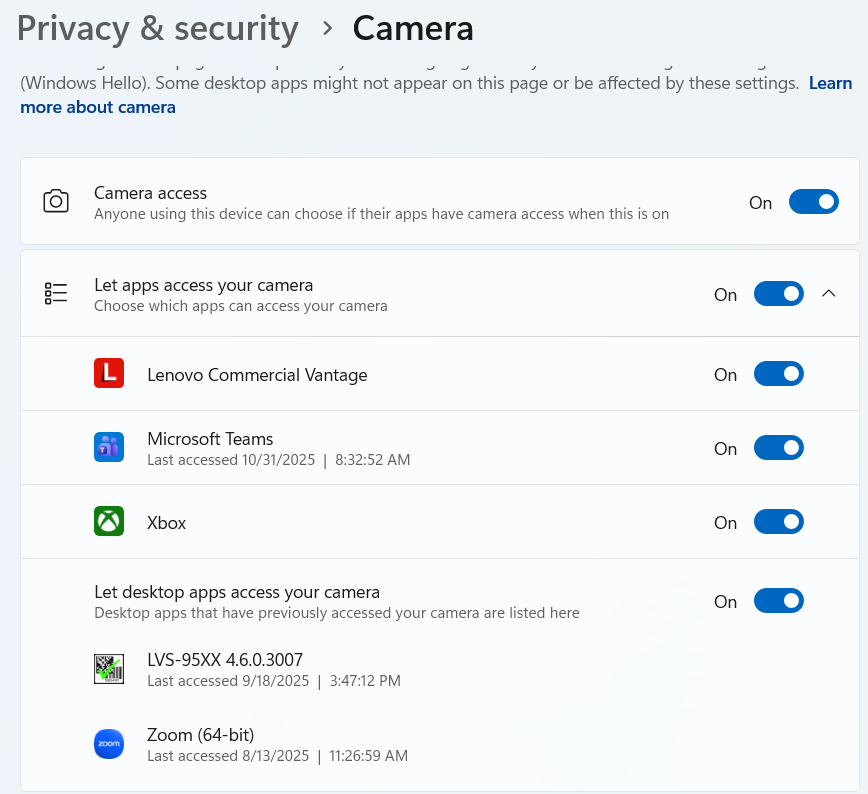
Go to Settings → Privacy & Security → Camera and ensure the following options are ON:
Camera access
Let apps access your camera
Let desktop apps access your camera
Additionally, confirm that the LVS-95XX application appears in the list of desktop apps with camera access, as shown in the image below:
2. If permissions are correctly configured but the issue persists
The problem may originate from the hardware connection or how Windows recognizes the USB device. To confirm if the camera is being properly detected by the system, follow these steps:
Open Device Manager from the Windows search bar.
Expand the section Universal Serial Bus controllers to view all connected USB devices.
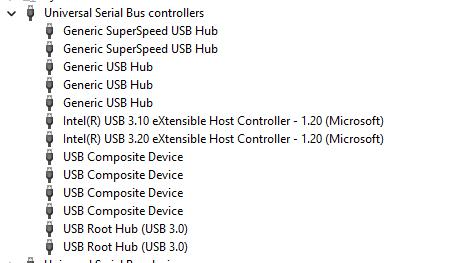
Disconnect and reconnect the USB cable of the LVS camera while observing this list. A new device should appear or disappear when you connect or disconnect it, this helps you identify which entry corresponds to the camera.
Once identified, right-click that device and select Properties.
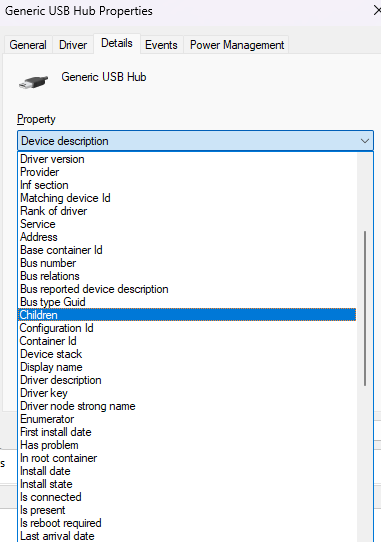
In the Properties window, open the Details tab.
From the drop-down menu, select the field named Children.
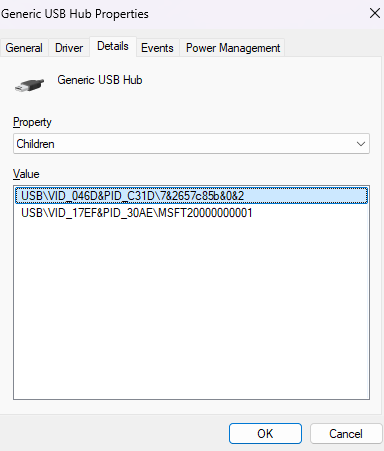
There should be two values listed.
If two values appear, it indicates that the system is recognizing the camera and the device.
If only one entry appears, it suggests that one of the internal devices is not being detected, pointing to a potential hardware issue with the LVS-9580. If this is the case, the device must be repaired or replaced.
Date/Revision History
First review 10/31/2024 V1.0
Author:
Mario Moreno, Technical Support Engineer
References
Was this article helpful?
That’s Great!
Thank you for your feedback
Sorry! We couldn't be helpful
Thank you for your feedback
Feedback sent
We appreciate your effort and will try to fix the article